
YouTube Auto-Dubbing vs. Your Own Dub
YouTube will translate and re-voice your videos into dozens of languages for free, on by default, while you sleep. That is a real offer — and a real question: is it good enough for the videos that matter?
Leave automatic dubbing on for the channel — free coverage in languages you'd never otherwise reach is an easy win. Then upload your own dubbed audio tracks for the handful of videos that actually represent you: flagship tutorials, product launches, anything with a punchline. YouTube's multi-language audio feature accepts your own track per language; the only rule is that you must delete an existing auto-dub before replacing it.
Both options are legitimate, they are not rivals, and the creators getting the most out of localization are using them together. Here is what each one actually does, straight from YouTube's own documentation, and how to decide per video.
What automatic dubbing actually does
According to YouTube's help pages, automatic dubbing generates translated audio tracks when you upload a video, and sometimes for videos you've already published. Dubs are marked "auto-dubbed" in the video description; viewers whose language settings match a dub get it by default and can switch back to the original anytime. If you'd rather review dubs before they go live, there's a "manually review dubs before publishing" option in your channel settings.
YouTube is also explicit about when a video won't be dubbed, which is the most useful part of the documentation for planning:
- the video is longer than 120 minutes;
- there's little or no speech, or the original language isn't supported yet;
- the source language can't be detected automatically;
- the speech is so fast that the dub would come out "unlistenable, sped-up" — YouTube's words, and a fair description of the failure mode;
- the video contains copyrighted content that triggered a claim.
Notice what that list implies: the eligibility rules are about mechanics — length, speed, detection — not about whether the result sounds good. A fully eligible video can still get a flat, one-voice-feeling dub, because nobody at YouTube listens to every generated track. That gap is exactly where your own dub comes in.
What "your own dub" means on YouTube
The multi-language audio feature lets you upload a separate dubbed audio track per language, for new uploads and for videos already on your channel. Requirements, again per YouTube: an audio-only file in a supported format, roughly the same length as the original, uploaded from YouTube Studio's Languages page, with access to Advanced features. If an auto-dub already exists in that language, you delete it first, then upload yours.
Two under-advertised benefits of doing this: translated titles and descriptions are indexed — your video can surface in search results written in the viewer's language — and the track defaults in for viewers with that language preference, exactly like an auto-dub. So a custom track doesn't sit in a submenu; it replaces the experience.
Where each option wins
| Auto-dubbing | Your own dub | |
|---|---|---|
| Cost | Free, unlimited | Minutes of work per video with AI; dollars or more with studios |
| Coverage | Dozens of languages at once | One language at a time — pick by audience data |
| Voice | Generic to the channel; can't be tuned per line | Each speaker keeps a matched voice; every line reviewable |
| Control | None — you find mistakes after publishing | Full: fix names, jokes, jargon before upload |
| Speed | Minutes after upload | Same day, often less |
| Best for | Back catalog, talking-head content, coverage experiments | Flagship videos, anything with brand voice or humor |
The hybrid workflow that makes sense
Here's the pattern that works for most channels, in order:
- Turn auto-dubbing on and forget about it. It costs nothing and occasionally surfaces a video in a language you'd never pursue manually. Check your analytics a month later — the Languages page in YouTube Studio shows where dubbed views come from.
- Pick your real targets from data, not guesses. If auto-dubbed views are concentrating in, say, Spanish and Japanese, those are your two custom-dub languages. One well-made track in a demonstrated market beats five speculative ones.
- Dub your top-performing evergreen videos yourself. For a typical creator that's the two or three videos that keep bringing subscribers — the evergreen tutorial, the channel trailer, the flagship review.
- Delete the auto-dub, upload your track. Then refresh the translated title and description for that language while you're in the Languages tab.
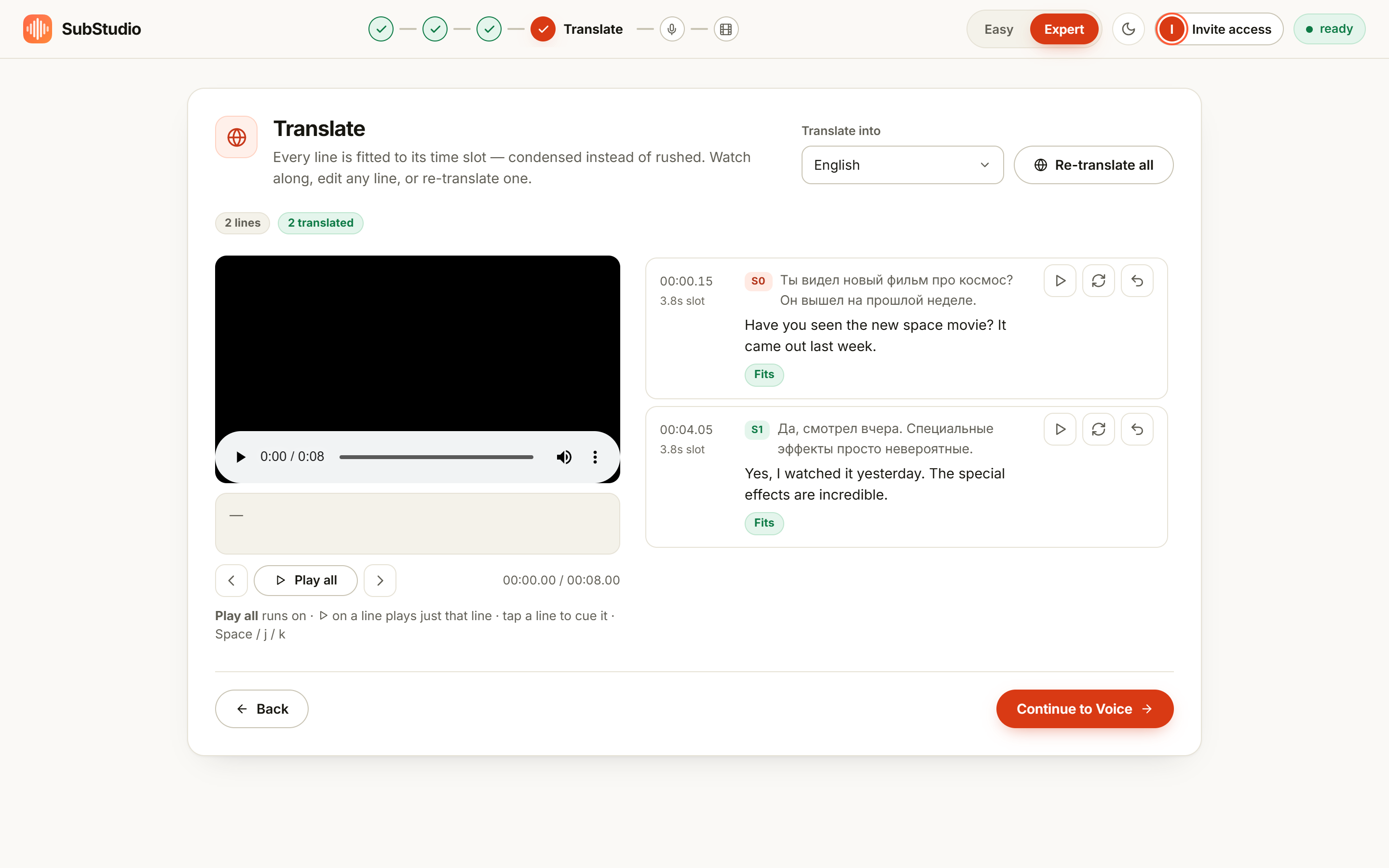
Producing the track itself takes minutes with a dubbing tool: import the video, run the pipeline, export the dubbed audio. In SwiftDub, a one-minute video is a coffee break, and the export labeled as a standalone audio file is precisely what the YouTube upload dialog wants. Speaker-preserving voices help more than you'd think here — viewers who are used to your voice keep it.
When to override the review option instead
If you don't want to produce custom tracks but care about quality on specific videos, YouTube's own "manually review dubs before publishing" toggle is the middle path: dubs still get generated, you just hear them before they appear. Reviewing a dub takes one listen per language — far cheaper than producing one, and it catches the catastrophic failures (wrong language, garbled line, a name mangled beyond recognition) without any production work.
The bottom line
Automatic dubbing changed the math: coverage is now free, so not using it is a choice to leave reach on the table. Custom dubs changed a different part of the math: producing one no longer costs studio money, so "premium quality only for flagship videos" is an affordable strategy instead of a luxury. Use the platform's scale for the long tail and your own pipeline for the videos that represent you.
Make a custom dub for your next video
Import the video, run the pipeline, export the audio track. Free plan covers short clips; Premium is $12.99 a month for videos up to 30 minutes.
Open the studioFrequently asked questions
Does YouTube dub videos automatically?
Yes — for eligible creators it's on by default. YouTube generates translated audio tracks, marks the videos as auto-dubbed, and lets viewers switch tracks. Videos over 120 minutes, with little speech, unsupported or undetectable source languages, very fast speech, or copyright claims can be ineligible.
Can I replace an auto-dub with my own?
Yes. In YouTube Studio, open Languages for the video, delete the existing auto-dub for that language, then upload your own dubbed audio file. You need access to Advanced features.
Should I turn auto-dubbing off on my channel?
Usually not. It's free reach in languages you wouldn't publish in otherwise. Turn it off — or enable manual review — if a mediocre automatic voice would be worse than silence on your most important videos.
Do custom dubs help search visibility?
Yes, indirectly and directly: translated titles and descriptions are indexed for search, and the custom track becomes the default audio for viewers with that language preference — same mechanics as an auto-dub, but with your voice and your wording.